Installation guide
There are several ways to install packages:
- From PPAC
- From LCS
- Include the binaries in your source control - recommended
While delaware provides packages in all formats, this installation guide will only focus on adding the binaries to source control. This guide assumes your have technical D365 and DevOps knowledge.
Downloading and extracing the package
LCS users can download the deployable package from their LCS project from the solution packages. PPAC only projects no longer have an LCS project, those users can download the packages from the downloads page.
Make sure that the application and platform version from the package you download is not higher than your environments application and platform version.
The downloads contain the unified package format which can be deployed directly to a PPAC environment. However, a better way is to extract the binaries and add those to your source control. To do this, extract the downloaded zip file first. Once extracted go to the 'CloudDeployablePackage/PackageAssets' folder. This folder contains another zip file with the binaries that need to be added. You can ignore the ExampleSolution_1_0_0_1.zip file.
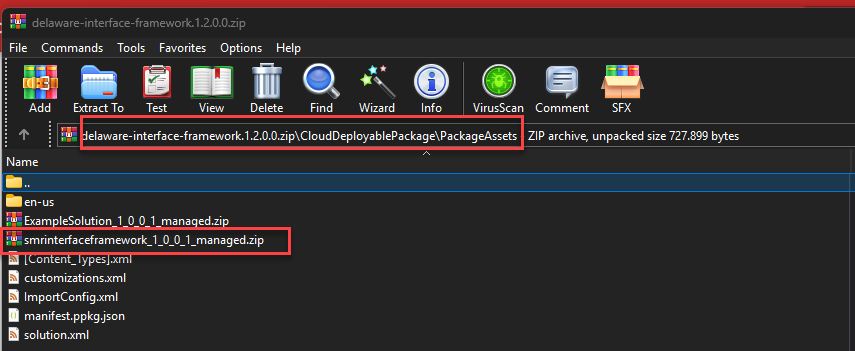
Extract the zip file with the name of the package.
Adding the binaries to source control
The extracted zip file from the previous step will contain a folder with the name of the package. This folder contains the binaries that must be added to source control. There are many ways to setup source control and many ways to setup build pipelines so the information here is kept generic. Consult the Microsoft Learn documentation if you need more assistance.
The process is as follows:
-
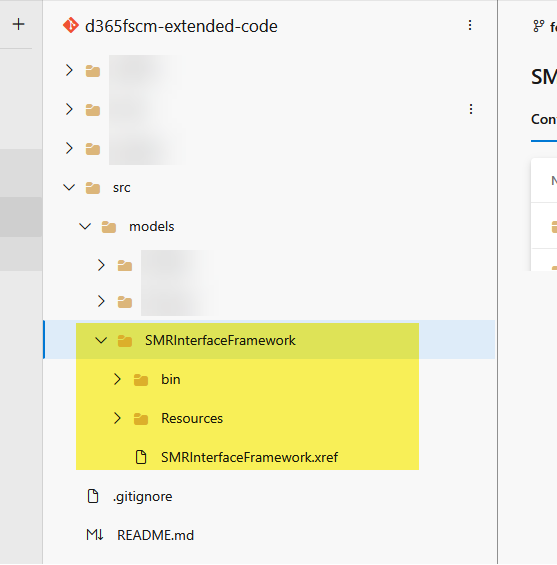
Create a new folder with the same name and casing as the .xref file in the package. In our example this is: /SMRInterfaceFramework
-
In the folder, copy all contents from the zip file so the structure looks like this. Depending on your setup and the package, the folder structure might be a little different. Put this new model directory where other custom / ISV models are located.
Note that you'll need a license to use a package, contact delaware to acquire a license.