Configuration
Setting up a number sequence
One of the fields in the message table is the sequence number. This number can be sent from an external application but if none is provided, a number is pulled from the message number sequence. For all outbound messages, this number sequence is also used. Configure the number sequence as shown below. Make sure not to add a constant value in the segments as the result of this number sequence is converted to to a number to allow for sorting.
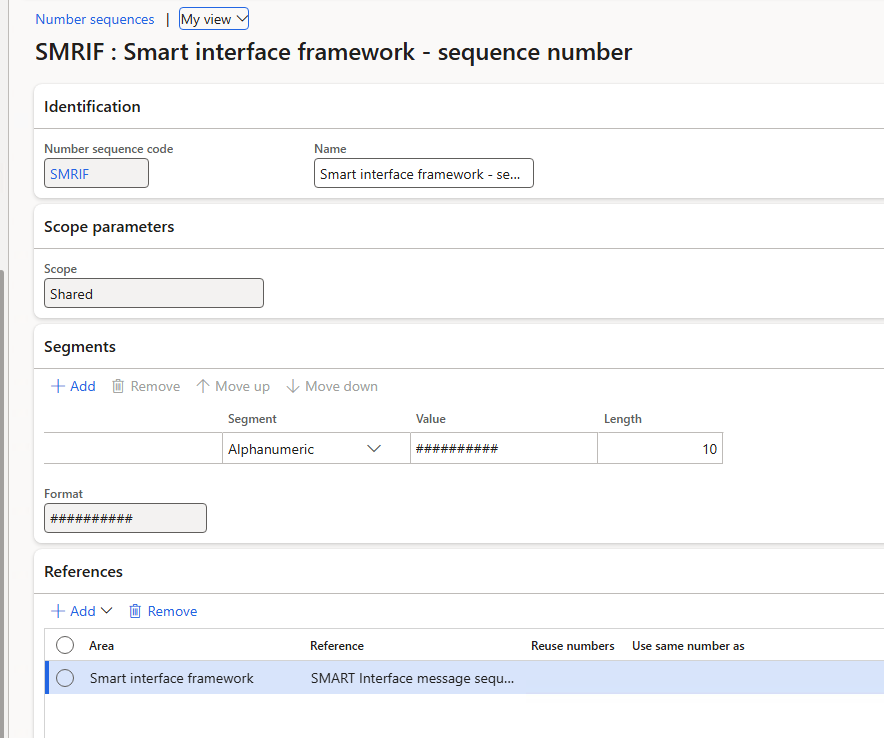
Interface framework parameters
All other configuration is done in the parameters form which can be located in the main menu under 'System administration > Setup > Interface framework > Interface framework parameters'.
General tab
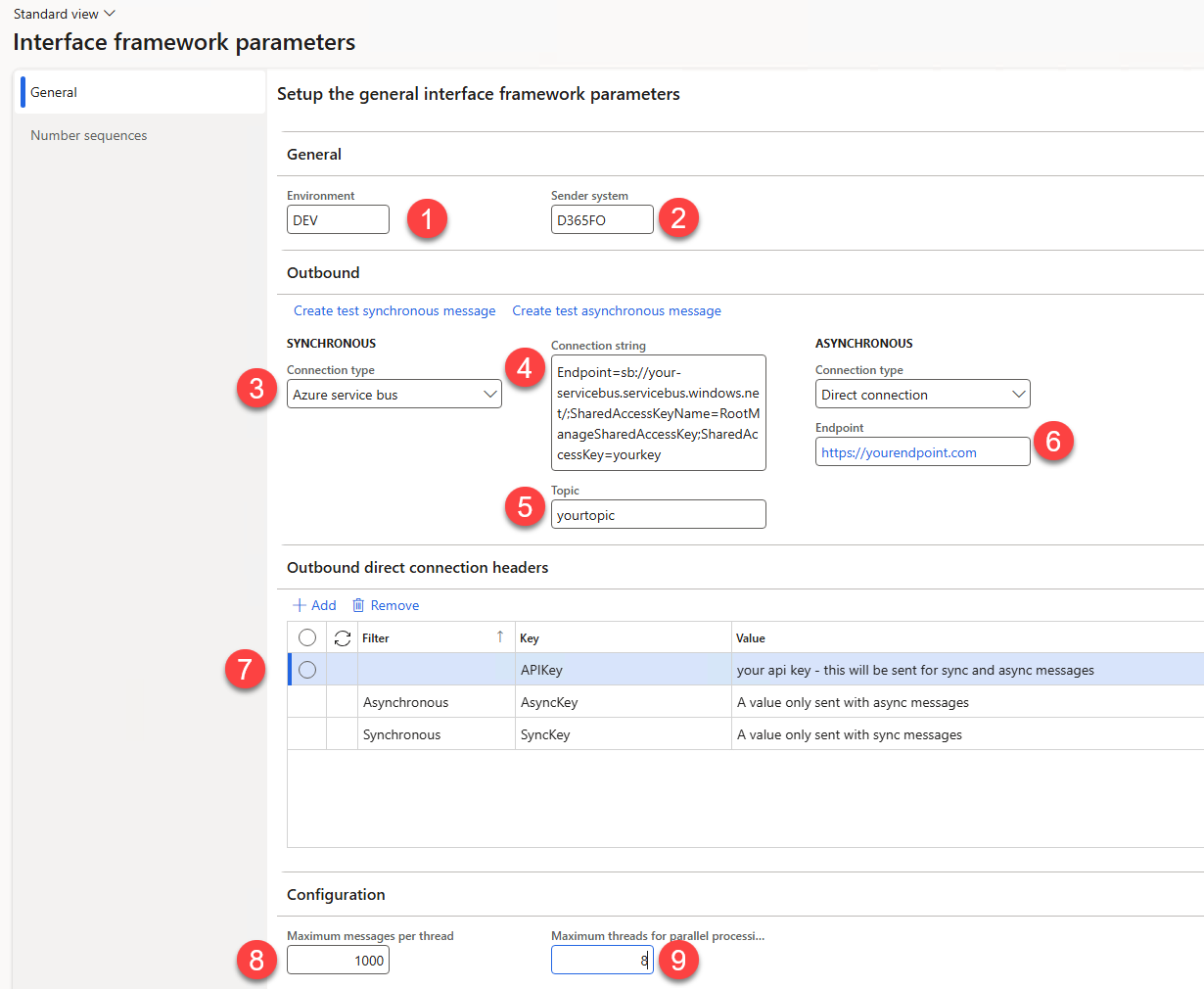
Field 1 and 2 are save on newly created outbound messages. The intent is to provide tracking information to the receiver.
Outbound tab
A connection can be defined for synchronous and for asynchronous messages. Both have the same options. With field 3, you can select the type of connection.
Connection type: Azure service bus
Enter the connection string in field 4 and the topic in field 5.
Connection type: Direct connection
This connection type supports sending to any HTTP API.
Enter the API endpoint in field 6.
In tab 8, you can add OAuth connection information if the endpoint requires it. Select the OAuth configuration you want to use with field 7.
In tab 9 you can provide HTTP header key value pairs (if any). You can add static and dynamic values. Right now, only the message type is supported as a dynamic value. You can extend the framework to add your own dynamic value types.
Outbound direct connection OAuth configuration
Setup
If the direct connection endpoint requires OAuth, an OAuth 2.0 configuration can be entered on this tab. This configuration can then be chosen in field 7 described above. The following fields need to be provided:
| Field | Description |
|---|---|
| OAuth configuration | A unique id for this OAuth configuration, to be chosen in field 7 on the 'Configuration' tab. |
| Client id | The client id of the app registration in Entra ID used to request an OAuth token. |
| Key vault company | The company in which the keyvault entry for the secret is configured. |
| Client certificate key vault secret | The key vault secret containing the client secret for the app registration in the Client id field. |
| Token Endpoint | The OAuth 2.0 endpoint where the token will be requested. |
| Resource | The resource to which access is being requested. |

It is possible to configure multiple OAuth configurations. This can be used to easily switch between different systems or environments. These configurations will persist across database copies, except for the secret value inside the key vault configuration.
Note: This facilitates easy reconfiguration after a database copy, while guaranteeing that no accidental authentication from e.g. a UAT to a PRD environment can occur.
Token lifecycle
A token is automatically requested whenever a message is sent and no valid token is present. This token is stored in the AOS cache and is available to all user sessions connected on this same AOS.
When the lifetime of a token has been exceeded, it will be refreshed the next time a token is needed. The 'Refresh', 'View' and 'Clear' buttons on top of the OAuth configuration grid can be used to inspect and manage the current token status.
| Action | Description |
|---|---|
| Refresh | Ensures that a valid token is present in the cache. If this is not the case, a new token will be requested, and will be stored in the cache. |
| Clear | Removes any existing tokens from the cache. |
| View | Outputs the current token in the cache. If no token is present, none will be requested. |
Configuration tab
Field 10 allows you to set the amount of messages that gets processed in one batch thread.
Field 11 sets the maximum number of threads used in one batch job execution of the parallel batch job. The best value depends on the size of your environment, this should be lower on T2 environments and can be much higher for production environments.